
Embeddable Chat Widget: From Zero to Production in 5 Minutes
Citai Team
March 6, 2026 · 9 min read
One line of code, a complete assistant
<script src="https://citai.ai/widget.js"
  data-api-key="sk-your-key"
  data-theme="light"
  data-position="bottom-right"
  data-welcome-message="Hi! How can I help you?">
</script>
That’s it. Your website now has an AI assistant with access to your entire knowledge base. No custom backend needed, no React, no dependencies.
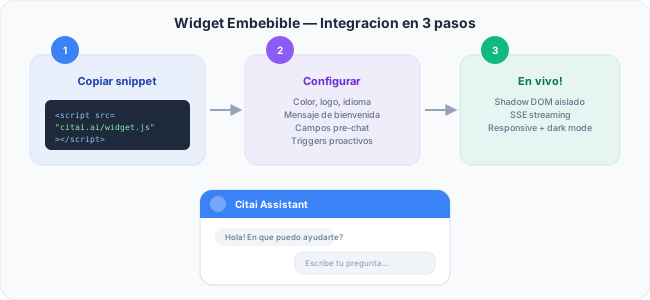
Technical architecture
Shadow DOM: total isolation
The widget uses closed Shadow DOM. This means your CSS doesn’t affect the widget, the widget’s CSS doesn’t affect your site. No conflicts with Bootstrap, Tailwind, or any framework.
SSE Streaming in real time
Responses arrive token by token via Server-Sent Events using fetch + ReadableStream. No WebSocket, no extra libraries. Users see the response building in real time.
Session persistence
Conversations are saved in localStorage. If the user closes and returns, they pick up where they left off. History loads from the server automatically.
Full visual configuration
| Parameter | Description | Example |
|---|---|---|
data-theme |
Visual theme | light, dark, auto |
data-position |
Widget corner | bottom-right, bottom-left |
data-primary-color |
Main color | #3b82f6 |
data-logo |
Your logo URL | https://your-site.com/logo.png |
data-welcome-message |
Initial message | Hi! How can I help you? |
Advanced features
Pre-chat form
Capture name, email, or other data before the conversation. Configurable per field: required or optional.
Conversation starters
Suggested buttons that appear when the widget opens. Each starter fires a query against your KB directly.
Business hours
Define days and hours. After hours: capture form with name, email, and subject + custom message.
Proactive triggers
The widget can open automatically based on time spent, scroll percentage, or URL patterns.
Smart escalation
- Automatic: By low confidence threshold
- Manual: “Talk to a human” button always visible
- Webhooks: Instant notification with full conversation context
Multimedia FAQs
Images, videos, links, and carousels rendered directly in the chat.
Industry templates
Citai includes 4 pre-designed templates: E-commerce, SaaS, Education, and Health — each with optimized starters and welcome messages.
Install your widget in 30 seconds. Create your API key →
Try Citai for free
Create your intelligent knowledge base in minutes. No credit card required.
Create free accountRelated articles
Smart Escalation: When AI Should Hand Off to a Human
How to configure confidence-based, manual, and schedule-based escalation. Webhooks with full context to Slack, email, or Zendesk.
Read article → ProductAuto-Inject: How to Connect Your APIs Directly to the Chat Widget
Learn how to configure tools that run automatically with user data for personalized responses from the very first message.
Read article → ProductAutomatic Language Detection in AI Assistants
How Citai detects the user's language and responds in their language. Heuristics, multilingual embeddings, and content rules.
Read article →