
Automatic Language Detection in AI Assistants
Citai Team
March 6, 2026 · 8 min read
The problem: customers who speak different languages
If you sell in Latin America, Spain, Brazil, and the US, your customers speak Spanish, Portuguese, and English. The naive solution — three different chatbots, three duplicate knowledge bases — is expensive and hard to maintain.
The right solution: one assistant that detects language and responds automatically.
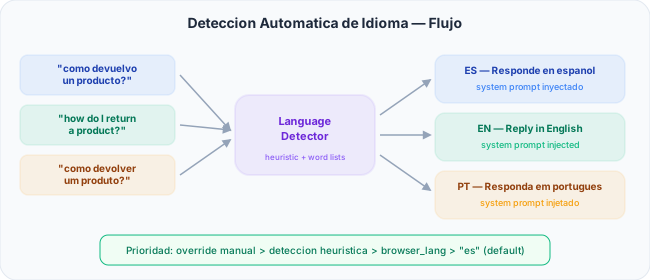
How detection works
Citai uses a cascade priority system to determine the response language:
| Priority | Source | Example |
|---|---|---|
| 1 (highest) | Manual override per KB | Always force Spanish |
| 2 | Heuristic text detection | “how do I return…” → EN |
| 3 | Browser language (widget) | Accept-Language: pt-BR |
| 4 (fallback) | Configurable default | Spanish |
Heuristic detection: fast and accurate
Instead of using an ML model (which adds latency and cost), Citai uses expanded frequent word lists per language. Words like “the”, “and”, “how” identify English; “como”, “para”, “puede” identify Spanish; “como”, “para”, “pode” identify Portuguese.
System prompt injection
Once detected, Citai injects the language into the LLM system prompt, ensuring the entire response is in the correct language.
Multilingual embeddings: the semantic magic
The embedding model (paraphrase-multilingual-MiniLM-L12-v2) understands 50+ languages in the same vector space:
- A Spanish document can answer an English question
- A Portuguese FAQ matches a Spanish query
- No need to duplicate content per language
Content rules: granular content control
Beyond language, you can configure rules controlling what the assistant responds:
BLOCK — Total block
Block questions on specific topics. The user gets a predefined message.
REDIRECT — Redirect to another source
Redirect to a URL or custom message. Useful for topics requiring mandatory human attention.
FILTER — Fragment filtering
Filter retrieved fragments containing blocked terms before sending to the LLM. The LLM never sees that information.
Visual configuration
Language and content rules are configured from the visual interface in each KB’s RAG config. Toggle, select, and inline CRUD — no code needed.
One assistant, all languages. Try Citai →
Try Citai for free
Create your intelligent knowledge base in minutes. No credit card required.
Create free accountRelated articles
Embeddable Chat Widget: From Zero to Production in 5 Minutes
Install an AI assistant on your website with one line of code. Shadow DOM, SSE streaming, themes, pre-chat forms, and smart escalation.
Read article → Use CaseAI for E-commerce: Automate Product, Shipping, and Returns Support
Complete use case: how an online store can resolve 90% of queries automatically with AI and cut support costs.
Read article → Practical GuideHybrid Search: How to Balance Semantic and Keyword Search in RAG
Learn to adjust the weight between vector search and BM25 to maximize relevance based on your content type.
Read article →