
How to Automate FAQs with Artificial Intelligence
Citai Team
March 6, 2026 · 10 min read
The hidden cost of repetitive questions
Between 40% and 60% of support tickets are questions already answered in documentation.
How does it work?
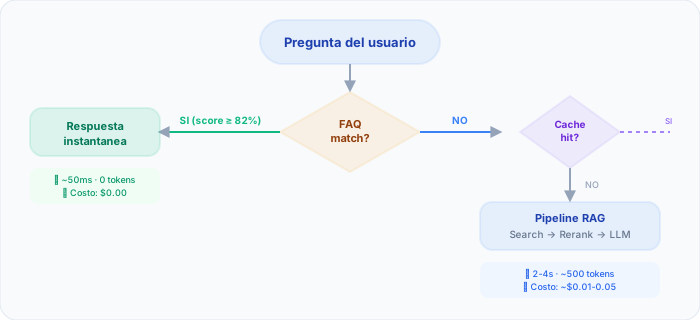
Semantic FAQ search
Instead of exact word matching, Citai uses embeddings to understand meaning:
- “How do I cancel my account?” → Match with “Subscription cancellation process”
- “Login not working” → Match with “Access problem solutions”
Instant response, zero cost
When the question matches an existing FAQ (score ≥ 82%):
- 0 tokens consumed = 0 API cost
- ~50ms response vs 2-4 seconds with LLM
- 100% accurate because it’s the answer you wrote
Auto-FAQ: the system that learns
Citai analyzes frequent unanswered questions and generates suggested answers for you to approve.
FAQ Quality Scoring
Not all FAQs are created equal. An intelligent system evaluates each FAQ’s quality to prioritize improvements:
| Criterion | Weight | What it evaluates |
|---|---|---|
| Hit rate | 30% | How often does this FAQ resolve questions? |
| User satisfaction | 25% | Do users give positive feedback after the response? |
| Semantic coverage | 20% | Does the question cover common variations? |
| Content freshness | 15% | When was it last updated? |
| Completeness | 10% | Does the answer include multimedia, links, clear steps? |
How to identify low-quality FAQs
- Hit rate > 10 but negative feedback > 20% — The answer does not satisfy
- FAQ with no hits in 30 days — Likely irrelevant or poorly worded
- Multiple FAQs with semantic overlap > 85% — Consolidate into one
- FAQ with answer over 500 words — Too long for quick resolution
Measuring Effectiveness: Key Metrics
Hit Rate per FAQ
The percentage of queries each FAQ resolves. FAQs with the highest hit rate are your most valuable assets — protect and keep them updated.
FAQ Savings (real cost reduction)
Each FAQ match avoids an LLM call. On Citai’s Free plan, FAQ matches do not consume plan queries — they are unlimited and free. Good FAQ coverage dramatically extends your AI budget.
Post-FAQ Escalation Rate
How many users who receive a FAQ answer then request a human agent? If this rate exceeds 15%, your FAQs are not resolving needs effectively.
Auto-FAQ Generation Workflow
Citai’s Auto-FAQ system follows a structured flow:
- Unanswered question detection — Analyzes knowledge gaps prioritized by frequency
- Candidate answer generation — Searches KB context and generates an answer with the LLM
- Deduplication — Verifies no similar FAQ exists (threshold >= 0.85)
- Human review — Approve, reject, or edit before activation
FAQ Maintenance Lifecycle
FAQs are not “set and forget”:
- Week 1: Create the 20-30 most frequent FAQs with rich formatting
- Weeks 2-8: Review knowledge gaps weekly, approve/reject Auto-FAQs, monitor hit rate
- Monthly: Consolidate overlapping FAQs, update those with negative feedback, remove FAQs with 0 hits in 60 days
- Quarterly: Analyze new question patterns, adapt to product changes, review threshold settings
Common Mistakes When Automating FAQs
- Creating too many similar FAQs — One FAQ with a canonical question is enough; semantic matching covers variations
- Answers that are too long — Keep to 150-200 words max; for complex topics, summarize with a link to the full document
- Not updating obsolete FAQs — Review pricing, policies, and procedures monthly
- Threshold set too low — Keep at 0.80+ and adjust only based on real data
- Ignoring negative feedback — If users consistently give thumbs-down, review and rewrite the answer
Automate your FAQs. Create your free account →
Try Citai for free
Create your intelligent knowledge base in minutes. No credit card required.
Create free accountRelated articles
FAQ vs RAG: When to Use Each Strategy and How to Combine Them
Guide to deciding when to answer with direct FAQ vs full RAG search, and how to optimize the combined flow.
Read article → Use CaseHow to Reduce Support Tickets with an AI Assistant
Practical guide to implementing an AI assistant that resolves queries automatically and escalates complex ones.
Read article → ProductIntelligent Knowledge Base: A Guide for Businesses
Learn to build an effective knowledge base: documents, FAQs, health score, and smart routing.
Read article →