
AI for E-commerce: Automate Product, Shipping, and Returns Support
Citai Team
March 6, 2026 · 10 min read
The modern e-commerce challenge
Online stores receive thousands of questions about the same topics: shipping, returns, sizes, stock, payment methods. The support team spends 80% of their time copying and pasting the same answers. Meanwhile, complex queries (real complaints, lost orders) sit at the end of the queue.
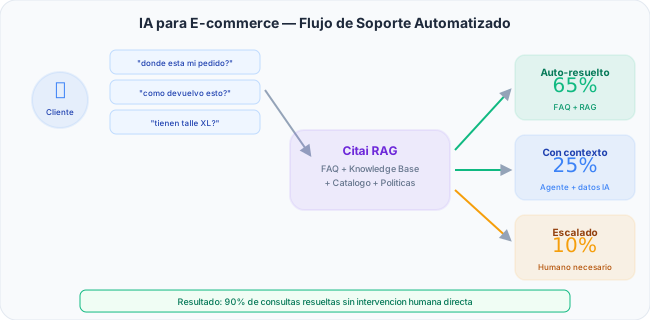
Recommended KB structure
The key is organizing your knowledge into multiple thematic bases:
| KB | Content | Query type |
|---|---|---|
| Catalog | Product sheets, sizes, materials, specs | “What material is this shirt?” |
| Logistics | Shipping times by zone, costs, couriers | “How long does shipping to Texas take?” |
| Policies | Returns, warranties, exchanges, payment | “Can I return a used product?” |
| Promotions | Active discounts, coupons, conditions | “Do you have bulk discounts?” |
With Smart Routing, Citai automatically routes each question to the correct KB.
FAQs that cover 70%
Online stores have a predictable pattern: the same 20-30 questions represent most volume. Configure them as FAQs for instant response.
Top 10 e-commerce questions
- “How long does shipping take?” → FAQ with time table by zone
- “How do I return a product?” → FAQ with step-by-step process
- “Is shipping free?” → FAQ with conditions
- “What payment methods do you accept?” → FAQ with complete list
- “Do you have size M?” → RAG searches catalog (dynamic)
- “Can I change my order?” → FAQ with change policy
- “Where is my order?” → Escalation (requires order data)
- “Do you ship to my city?” → FAQ with coverage by zone
- “Does the product have warranty?” → FAQ by product category
- “How do I use a discount code?” → FAQ with instructions
Widget configured for e-commerce
Optimized conversation starters
The widget includes an E-commerce template pre-configured with starters like “What are shipping times?”, “I want to return something”, “Do you have bulk discounts?”
Business hours + smart escalation
- During hours: AI responds + option to escalate
- After hours: FAQs work 24/7, capture contact for human-needed queries
- Order numbers: When user mentions #12345 → auto-escalate with full context
Expected results
Step-by-step implementation plan
- Day 1: Create account + upload shipping and return policies
- Day 2: Add product sheets as second KB
- Day 3: Configure top 20 FAQs from your support history
- Day 4: Install widget + configure business hours
- Day 5: Monitor analytics, adjust FAQs with detected gaps
Automate your store’s support. Start free →
Try Citai for free
Create your intelligent knowledge base in minutes. No credit card required.
Create free accountRelated articles
Embeddable Chat Widget: From Zero to Production in 5 Minutes
Install an AI assistant on your website with one line of code. Shadow DOM, SSE streaming, themes, pre-chat forms, and smart escalation.
Read article → ProductSmart Escalation: When AI Should Hand Off to a Human
How to configure confidence-based, manual, and schedule-based escalation. Webhooks with full context to Slack, email, or Zendesk.
Read article → ProductAutomatic Language Detection in AI Assistants
How Citai detects the user's language and responds in their language. Heuristics, multilingual embeddings, and content rules.
Read article →