
Semantic Cache: How to Reduce LLM Costs by Up to 70%
Citai Team
March 6, 2026 · 10 min read
The problem: every question costs tokens
Each LLM response consumes tokens. At high volume, this adds up fast.
But many users ask similar questions: “how do I cancel?”, “I want to cancel my account”, “cancellation process” — all deserve the same answer.
How does semantic cache work?
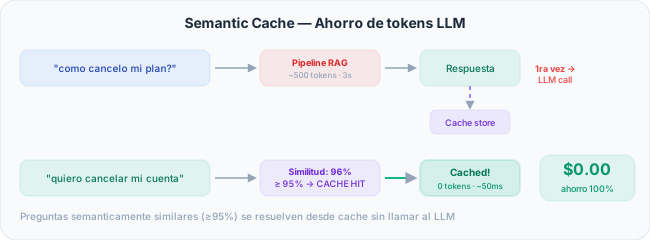
- User asks → Citai computes the query embedding
- Searches cache for a question with similarity ≥ 95%
- If found → returns cached response (0 tokens, ~50ms)
- If not → runs full RAG pipeline and caches the result
Smart invalidation
Cache auto-invalidates on document upload, FAQ changes, or RAG config updates.
Strategies to optimize cache hit rate
1. Adjust the similarity threshold
- 0.95 (default): Ideal for most cases. Only caches close paraphrases
- 0.92-0.93: More aggressive. Captures more variations with slightly higher false-positive risk
- 0.97-0.98: Conservative. Only near-exact matches — ideal for precision-critical domains
2. Query normalization
Before computing the embedding, Citai normalizes the query: removes extra whitespace, converts to lowercase, and strips special characters. This increases hit probability without affecting quality.
3. FAQ matching as a first filter
FAQs are resolved before the cache. If a question matches an FAQ (threshold >= 0.82), the cache is not even consulted.
Cost savings calculation: real numbers
Example for a support team with 10,000 queries/month:
| Scenario | LLM Queries | Cache Queries | LLM Cost | Savings |
|---|---|---|---|---|
| No cache | 10,000 | 0 | $300-500 | $0 |
| Cache 40% hit | 6,000 | 4,000 | $180-300 | $120-200/mo |
| Cache 60% hit | 4,000 | 6,000 | $120-200 | $180-300/mo |
| Cache 70% hit | 3,000 | 7,000 | $90-150 | $210-350/mo |
Deep-dive into invalidation patterns
Citai implements automatic invalidation at three levels:
- Content: Any uploaded or reprocessed document invalidates the entire KB cache
- Configuration: Changes to RAG config or LLM model invalidate the cache
- Time (TTL): Entries older than configured TTL are automatically ignored (default: 7 days)
Monitoring and debugging the cache
- Cache Hit Rate: Percentage of queries resolved from cache. Target: >40%
- Estimated savings: LLM token cost avoided based on hits
If a query does not hit the cache when it should:
- Check the embedding: Use the Playground to see both queries and their cosine similarity
- Review the threshold: Similarity may be at 0.93 while your threshold is 0.95
- Check invalidation: Cache may have been recently invalidated
Comparison with other caching strategies
| Strategy | Match Type | Latency | Precision |
|---|---|---|---|
| Redis (exact key) | Exact text | ~1ms | Perfect |
| CDN | Exact URL | ~10ms | Perfect |
| Semantic cache | Meaning | ~50ms | High (>=95%) |
| Prompt cache (LLM) | Exact prefix | Variable | Perfect |
Redis with an exact key only works if the user types exactly the same thing. With semantic cache, “how do I cancel”, “I want to cancel”, “cancellation process” all hit because the meaning is the same.
Semantic cache is enabled by default. Try Citai →
Try Citai for free
Create your intelligent knowledge base in minutes. No credit card required.
Create free accountRelated articles
How Much Does an AI Chatbot Really Cost: Complete Breakdown
Real cost breakdown of an AI chatbot: LLM tokens, embeddings, hosting, and how Citai optimizes each component.
Read article → TechnologyCross-Encoder Reranking: How to Improve Your Chatbot's Accuracy
Learn how cross-encoder reranking dramatically improves RAG response relevance.
Read article → TechnologyWhat is RAG? Retrieval-Augmented Generation Explained
Discover how RAG combines intelligent search with generative AI to deliver accurate answers with verifiable sources.
Read article →